
All Blogs
Intercom pricing starts at $29/seat in 2026, but total costs rise fast. See what drives your bill and what revenue teams choose for pipeline

Paige Rankwell
GTM Analyst
Published On

Software pricing rarely ends with the number shown on the pricing page. Your monthly subscription often grows as your team adds users, adopts AI features, and expands customer engagement workflows. What looks affordable at first can become a much larger investment over time.
Intercom has evolved from a live chat platform into an AI-first customer communication platform. It combines messaging, automation, customer support, and AI inside one product.
Although its entry pricing appears straightforward, your total cost can increase through teammate seats, AI usage, contacts, premium features, and advanced automation capabilities.
Before choosing a pricing plan, you should understand what drives your monthly bill and which capabilities require additional investment.
In this guide, you'll learn how Intercom pricing works, what each plan includes, the hidden costs buyers often overlook, and whether an AI SDR delivers stronger pipeline ROI for your revenue team.
In A Nutshell
Here's a quick breakdown of Intercom pricing in 2026:
Intercom pricing starts at $29/seat/month (annual billing), but total costs increase with teammate seats, Fin AI usage, contacts, and premium features.
Fin AI is priced separately at $0.99 per successful resolution, making monthly costs usage-based rather than fixed.
Your total cost extends beyond the subscription through additional seats, AI usage, integrations, implementation, and supporting sales tools.
Intercom is designed for customer communication and support, not for identifying anonymous visitors or generating qualified pipelines.
Revenue teams often need additional platforms for AI SDR qualification, meeting booking, visitor identification, and outbound orchestration.
If your priority is turning website traffic into qualified meetings, Breakout offers an AI SDR that identifies buyers, qualifies intent, and books meetings automatically.
What Determines Your Intercom Bill?
Your monthly Intercom subscription fee is only one small part of your total software investment over time. Multiple usage-based variables significantly affect what your team actually pays every single billing cycle.
These factors have the biggest impact on Intercom pricing:
Number of Seats: Every support agent or team member requiring full inbox access needs a paid monthly seat license. Seat prices scale rapidly when you invite sales, success, and product team members to collaborate on customer queries.
AI Agent Usage: Intercom bills its Fin AI agent separately based on successful resolution outcomes rather than standard seat access. High ticket volumes cause monthly AI bills to skyrocket unexpectedly when customer support queries surge during product launches.
Contacts and Audience Size: Your base price increases as your active audience database expands beyond default account limits. Storing thousands of inactive contacts pushes your team into higher pricing bands regardless of actual chat activity.
Automation Workflows: Basic automation triggers come included, but building complex branching workflows requires upgrading to higher-tier plans. Advanced routing logic and custom conditional paths quickly force your team into enterprise billing categories.
Integrations: Standard CRM connections work on lower tiers, but custom API access and enterprise data syncing require premium upgrades. Connecting specialized revenue stack tools increases overall operational overhead and monthly subscription obligations across your entire organization.
Premium Features: Essential capabilities like custom reporting, workload management, and SLA tracking remain locked behind top-tier plans. Paying extra for basic operational visibility makes total platform ownership far more expensive than initial sales quotes suggest.
What's Included In Intercom?
Intercom combines customer messaging, support automation, and conversational artificial intelligence within one centralized platform. However, not every capability is available across every pricing tier without paying extra fees.
Here's what you typically get with Intercom:
Live Chat: You receive a customizable website messenger widget to chat directly with visiting web users in real time.
Shared Inbox: Your support team gets a single unified workspace to manage, assign, and resolve incoming user tickets together.
Knowledge Base: Build a public help center where customers search for self-service articles and product answers.
Fin AI: Your team can deploy conversational artificial intelligence to answer recurring customer questions using your existing documentation.
Automation Workflows: Construct automated rules that route inbound tickets to specific support representatives based on keywords.
Reporting: Your team receives basic analytics dashboards to track conversation resolution times, ticket volume, and team performance metrics.
CRM Integrations: Get direct data syncing with popular tools like Salesforce, HubSpot, and Slack to maintain customer context.
What Intercom Doesn't Include
Although Intercom handles customer support communication well, revenue teams need additional capabilities to convert anonymous website visitors. You cannot rely on support chat platforms to generate pipeline or automatically book meetings with sales executives.
These capabilities typically require additional tools:
Anonymous Visitor Identification: Intercom waits for visitors to submit forms instead of deanonymizing B2B traffic before users leave your site.
AI SDR Qualification: Standard chatbots answer support questions, but they fail to qualify complex B2B buying criteria like target budget.
Autonomous Meeting Booking: Intercom directs users to forms rather than instantly routing qualified decision-makers directly onto calendar booking screens.
Buying Committee Discovery: Customer support tools track individual tickets instead of mapping entire buying committees across target accounts.
Outbound Sequencing: You cannot launch automated multi-channel outbound follow-ups when high-value accounts visit your website without converting.
Pipeline Generation: Intercom measures success through resolved ticket counts rather than booked sales meetings, closed deals, or generated pipeline.
How Much Does Intercom Cost In 2026?
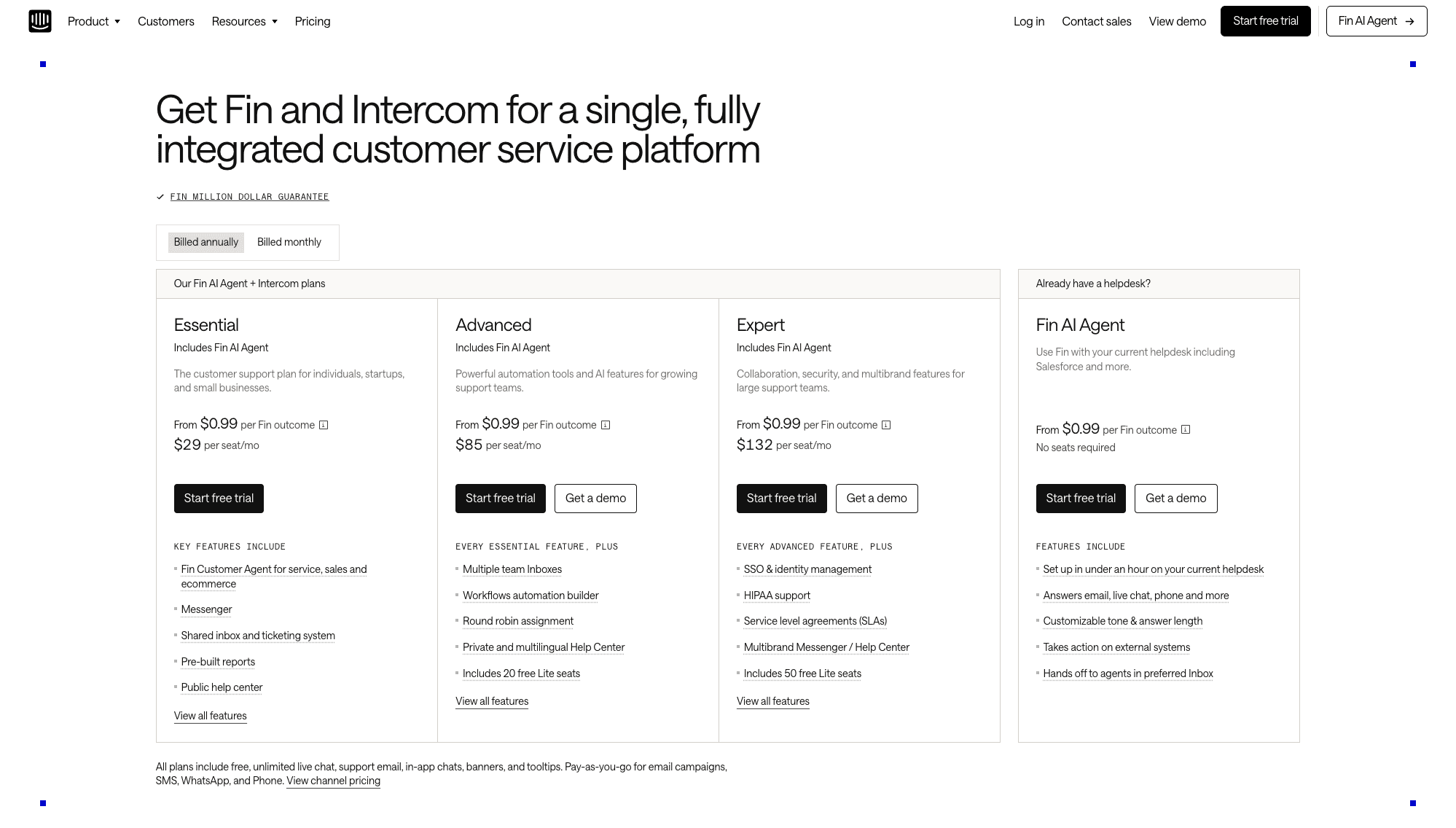
Intercom uses a combination of seat-based and usage-based pricing rather than a single flat monthly subscription. Your total cost depends on the plan you choose, the number of teammates using the platform, Fin AI usage, messaging channels, and optional add-ons.
Evaluating your expected usage is just as important as comparing the advertised seat price. Here's a breakdown of Intercom's pricing plans:
Essential
Best for: Individuals, startups, and small businesses.
Starting price:
$39 per seat/month on monthly billing
$29 per seat/month on annual billing
Core features
Fin Customer Agent for service, sales and ecommerce
Messenger
Shared inbox and ticketing system
Pre-built reports
Public help center
Limitations
Growing support organizations may quickly outgrow the Essential plan because it lacks advanced workflow automation, multiple team inboxes, multilingual help centers, and free Lite seats for internal collaborators. Teams expecting rapid growth should compare higher plans before committing long-term.
Advanced
Best for: Growing support organizations with larger customer operations
Starting price:
$99 per seat/month on monthly billing
$85 per seat/month on annual billing
Core features
Every Essential feature, plus:
Multiple team Inboxes
Workflows automation builder
Round-robin assignment
Private and multilingual Help Center
Includes 20 free Lite seats
Limitations
Although automation improves significantly, your organization still pays separately for Fin AI usage and other usage-based services. Growing customer conversations can increase monthly costs beyond the advertised seat pricing.
Expert
Best for: Enterprise organizations with advanced governance and security requirements
Starting price:
$139 per seat/month on monthly billing
$132 per seat/month on annual billing
Core features
Every Advanced feature, plus:
SSO & identity management
HIPAA support
Service level agreements (SLAs)
Multibrand Messenger / Help Center
Includes 50 free Lite seats
Limitations
Enterprise functionality increases your subscription value, but AI usage charges and other variable costs remain separate from seat pricing. Organizations should evaluate overall ownership costs instead of comparing subscription prices alone.
Fin AI Agent Pricing
Fin AI follows a separate usage-based pricing model regardless of your subscription tier.
Intercom charges $0.99 per successful Fin outcome instead of charging per message or interaction. An outcome is counted when Fin successfully resolves a conversation, completes a workflow, or the customer leaves without requesting additional assistance. Multiple questions inside the same conversation count as a single billable outcome.
Key features include:
Set up in under an hour on your current helpdesk
Answers email, live chat, phone and more
Customizable tone & answer length
Takes action on external systems
Hands off to agents in preferred Inbox
This pricing model makes forecasting monthly costs more challenging than traditional seat-based software. As customer conversations increase, your AI costs grow alongside usage rather than remaining fixed.
Hidden Costs To Consider In Intercom
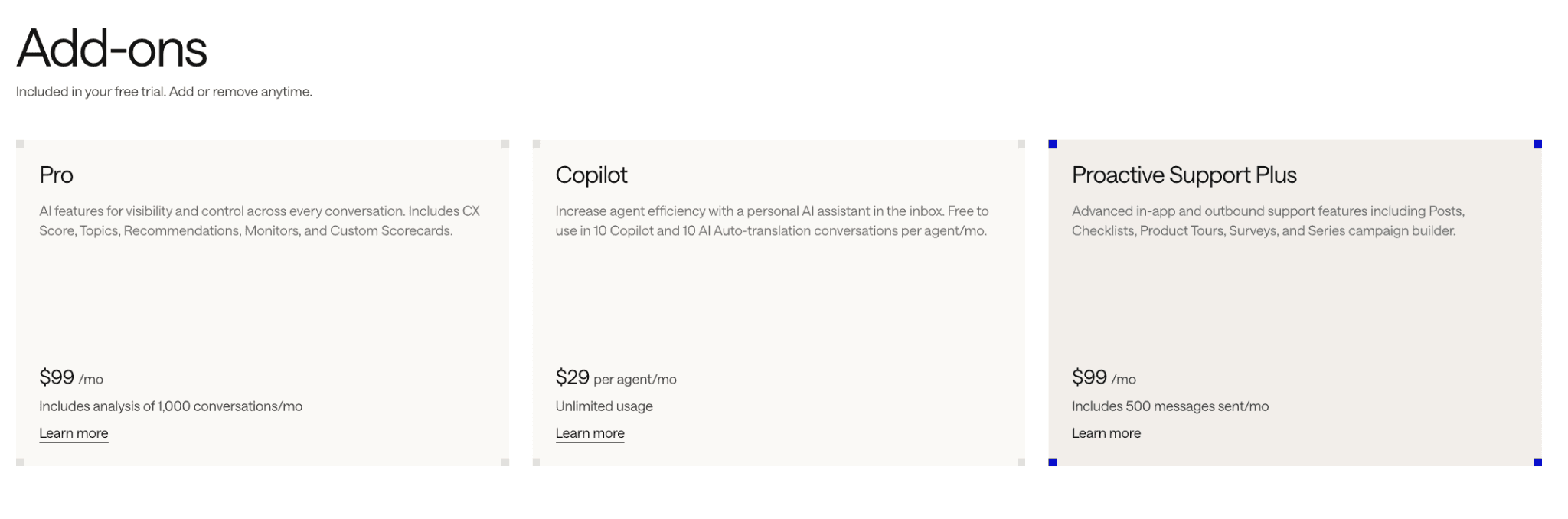
Subscription pricing listed on public software pages rarely reflects your actual total software bill at the end of the year. Secondary software add-ons, implementation, and operational maintenance requirements significantly increase overall platform costs for growing revenue teams.
These hidden expenses often surprise buyers:
Additional AI Usage: Usage fees for Fin AI outcomes scale indefinitely without natural spending caps when support ticket volume spikes unexpectedly.
More Teammate Seats: Adding sales reps, product managers, and account executives to review chat histories quickly doubles your monthly subscription invoice.
CRM Integrations: Deep bi-directional syncing with enterprise CRM architectures often requires purchasing premium tier upgrades or third-party middleware connections.
Sales Engagement Software: Intercom handles customer support, forcing your team to purchase separate sales platforms to manage cold outbound prospecting campaigns.
SDR Headcount: You still need human sales development representatives to manually qualify leads that arrive through basic website chat forms.
Implementation & Onboarding: Configuring complex routing rules, knowledge bases, and custom API integrations demands expensive internal technical bandwidth or external consultants.
Why Should You Choose Breakout Instead
Many organizations discover that customer communication and pipeline generation require different capabilities. Intercom helps your team communicate with customers after engagement begins.
Breakout focuses on identifying buyers, qualifying opportunities, and generating meetings before potential customers leave your website.
Here's why more GTM teams choose Breakout:
Real-Time AI Qualification
Breakout engages high-intent visitors through AI-led conversations while they actively evaluate your product. Instead of waiting for manual SDR follow-up, it qualifies buyers against your ideal customer profile during the same website session.
Anonymous Visitor Identification
Breakout identifies companies visiting your website before they submit forms or request demos. Your team gains visibility into buying intent earlier, allowing AI to begin relevant conversations before opportunities disappear.
Buying Committee Discovery
Enterprise purchases rarely involve one decision-maker. Breakout identifies additional stakeholders across the buying committee, giving your sales team a clearer picture of everyone influencing purchasing decisions.
Autonomous Meeting Booking
Qualified buyers can schedule meetings immediately after completing AI-led qualification. Breakout removes unnecessary delays by connecting prospects directly with the appropriate sales representative through automated calendar booking.
AI-Driven Inbound-to-Outbound Orchestration
Breakout does not stop after one website conversation. AI agents coordinate CRM updates, trigger outbound sequences, identify additional contacts, and maintain momentum across your revenue workflow without manual intervention.
Faster Speed-to-Lead
The highest buying intent exists while prospects actively research your solution. Breakout responds immediately, reducing delays that often occur when revenue teams depend entirely on manual lead routing and SDR availability.
Reduced SDR Workload
Your SDR team should spend time building relationships instead of repeatedly qualifying inbound visitors. Breakout automates repetitive qualification work so your representatives can focus on discovery calls, strategic conversations, and closing opportunities.
Conclusion
Intercom remains one of the strongest customer communication platforms available for support, messaging, and customer engagement. However, customer conversations alone rarely create predictable pipelines or increase qualified meetings.
Revenue growth requires more than answering questions after visitors decide to engage. If your priority is generating pipeline instead of managing customer conversations, you need a platform that acts before buyers leave your website.
Breakout identifies anonymous visitors, qualifies buying intent through AI-led conversations, books meetings automatically, and coordinates your inbound and outbound workflows without increasing headcount.
Stop paying only for conversations. See how Breakout turns website visitors into qualified meetings in minutes, not months. Start your free trial today.
FAQs
Q. How much does Intercom cost?
Intercom pricing depends on the plan you choose, the number of teammate seats, Fin AI usage, and optional premium features. Although entry-level plans appear straightforward, your monthly investment often increases as your organization adds users, automation, and AI-powered customer conversations.
Q. Is Intercom expensive?
Intercom can become expensive as your business grows because costs extend beyond the advertised subscription price. Additional teammate seats, Fin AI usage, premium features, and complementary revenue tools can significantly increase your total software investment over time.
Q. Does Intercom charge separately for AI?
Yes. Intercom bills Fin AI separately from its base subscription using a usage-based pricing model. Instead of paying a flat monthly fee for AI, your organization pays based on successful AI outcomes, making costs dependent on customer interaction volume.
Q. What is included in Intercom pricing?
Intercom plans typically include live chat, a shared inbox, knowledge base functionality, automation workflows, reporting, CRM integrations, and access to Fin AI. The exact feature set depends on your chosen pricing tier, with advanced capabilities reserved for higher-level plans.
Q. What is the biggest hidden cost of Intercom?
Many organizations focus on subscription pricing while overlooking additional AI usage, teammate seats, implementation, CRM integrations, and supporting revenue software. Those combined expenses often have a greater impact on long-term ownership costs than the base subscription itself.
Q. What is the best alternative to Intercom?
Intercom is an excellent platform for customer communication and support. If your priority is identifying buyers, qualifying intent, and booking meetings directly from website traffic, Breakout provides a purpose-built AI SDR that focuses on pipeline generation instead of customer messaging alone.


